> ## Documentation Index
> Fetch the complete documentation index at: https://velt.dev/docs/llms.txt
> Use this file to discover all available pages before exploring further.
# Inline Comments Setup
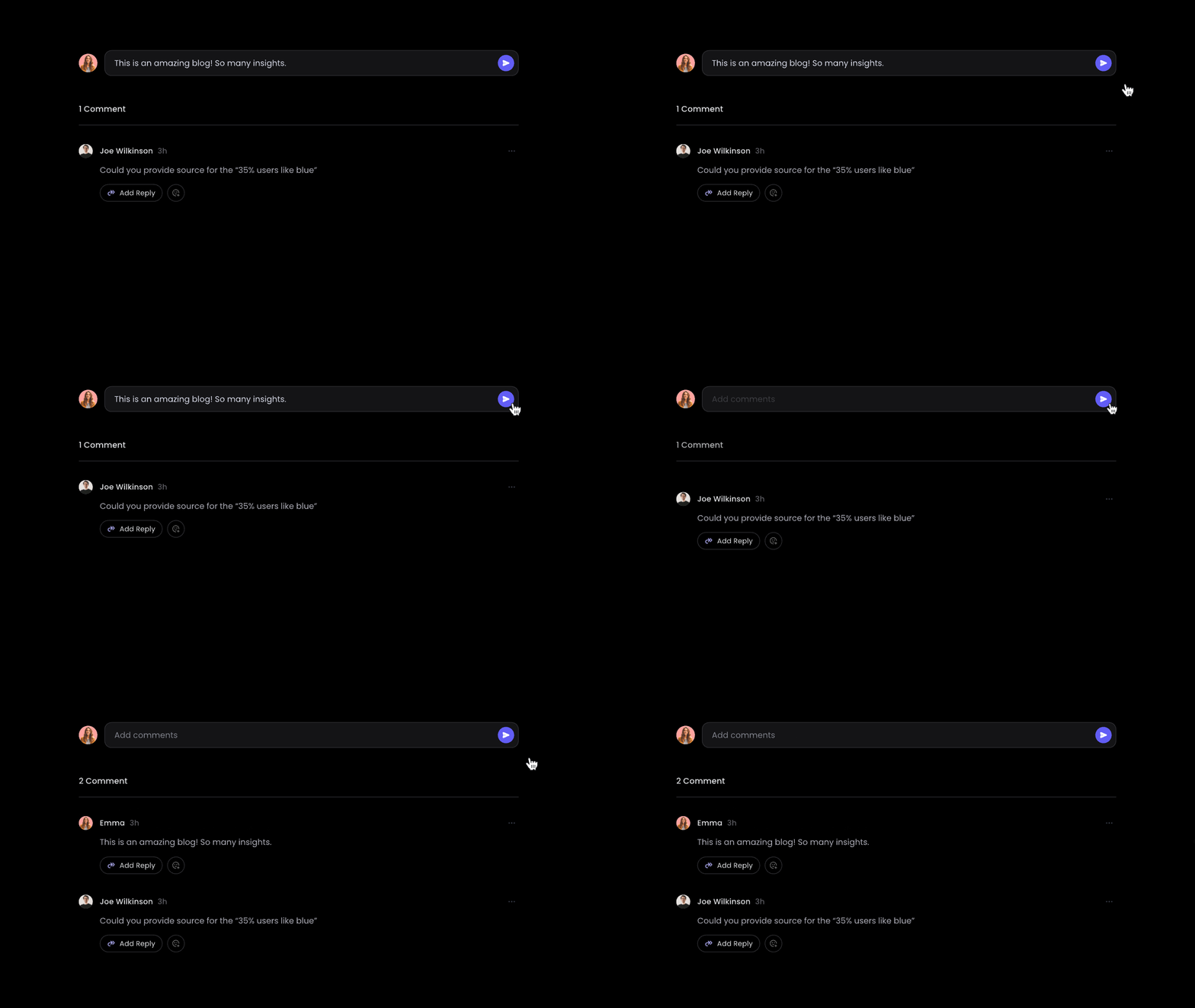
> [tab] React / Next.js
>
> ## 1. Import Comment components
>
> Import the `VeltProvider`, `VeltComments`, and `VeltInlineCommentsSection` component.
>
> ```js theme={null}
> import { VeltProvider, VeltComments, VeltInlineCommentsSection } from '@veltdev/react';
> ```
>
> ## 2. Add VeltComments component
>
> * Add the `VeltComments` component to the root of your app where your `VeltProvider` is.
> * This component is required to render comments in your app.
>
> ```js theme={null}
>
>
>
> ```
>
> ## 3. Add container to hold Inline Comments component
>
> * Create an element to hold your Inline Comments component, such as a `div` or `section`.
> * Add a unique element `id` to it.
>
> ```jsx theme={null}
>
> ```
>
> ## 4. Add VeltInlineCommentsSection component
>
> * Add `VeltInlineCommentsSection` component inside your container.
> * Add `targetElementId` property to the Velt Inline Comments component. This needs to match the id you set to the container. This binds the Inline Comments component with the desired container.
>
> ```jsx theme={null}
> targetElementId="container-id"
> />
> ```
>
> ## 5. (Optional) Make it single threaded or multithreaded
>
> * Default: `true`
> * By default inline comment section is multithreaded.
> * You can make it single threaded by setting `multiThread` attribute to `false`.
>
> ```jsx theme={null}
>
> ```
>
> ## 6. (Optional) Customize placeholder text
>
> Customize the placeholder text for comment, reply, and composer input fields.
>
> ```jsx theme={null}
> commentPlaceholder="Add a comment..."
> replyPlaceholder="Write a reply..."
> composerPlaceholder="Start typing..."
> />
> ```
>
> To customize placeholder text shown when **editing** an existing comment or reply, use `editPlaceholder`, `editCommentPlaceholder`, and `editReplyPlaceholder`. See [`VeltInlineCommentsSectionProps`](https://velt.dev/docs/api-reference/sdk/models/data-models#veltinlinecommentssectionprops) for details.
>
> ## 7. (Optional) Enable message truncation
>
> * Default: `false`
> * Truncate long messages in the list, showing a **Show more** toggle after the specified number of lines.
> * Use `messageTruncationLines` to control the cutoff (default: `4`).
>
> ```jsx theme={null}
> targetElementId="article0"
> messageTruncation={true}
> messageTruncationLines={3}
> />
> ```
> [tab] Other Frameworks
>
> ## 1. Add velt-comments component
>
> * Add the Velt Comments component to the root of your app.
> * This component is required to render comments in your app.
>
> ```html theme={null}
>
>
>
> ```
>
> ## 2. Add container to hold Inline Comments component
>
> * Create an element to hold your Inline Comments component, such as a `div` or `section`.
> * Add a unique element `id` to it.
>
> ```html theme={null}
>
> ```
>
> ## 3. Add velt-inline-comments-section component
>
> * Add `velt-inline-comments-section` component inside your container.
> * Add `target-element-id` property to the Velt Inline Comments component. This needs to match the id you set to the container. This binds the Inline Comments component with the desired container.
>
> ```jsx theme={null}
> target-element-id="container-id"
> shadow-dom="false"
> dialog-variant="dialog-variant"
> variant="inline-section-variant"
> dark-mode="true"
> >
>
> ```
>
> ## 4. (Optional) Make it single threaded or multithreaded
>
> * Default: `true`
> * By default inline comments are multithreaded.
> * You can make it single threaded by setting `multi-thread` attribute to `false`.
>
> ```html theme={null}
>
>
> ```
>
> ## 5. (Optional) Customize placeholder text
>
> Customize the placeholder text for comment, reply, and composer input fields.
>
> ```html theme={null}
> comment-placeholder="Add a comment..."
> reply-placeholder="Write a reply..."
> composer-placeholder="Start typing..."
> >
>
> ```
>
> To customize placeholder text shown when **editing** an existing comment or reply, use `edit-placeholder`, `edit-comment-placeholder`, and `edit-reply-placeholder`. See [`VeltInlineCommentsSectionProps`](https://velt.dev/docs/api-reference/sdk/models/data-models#veltinlinecommentssectionprops) for details.
>
> ## 6. (Optional) Enable message truncation
>
> * Default: `false`
> * Truncate long messages in the list, showing a **Show more** toggle after the specified number of lines.
> * Use `message-truncation-lines` to control the cutoff (default: `4`).
>
> ```html theme={null}
> target-element-id="article0"
> message-truncation="true"
> message-truncation-lines="3">
>
> ```
```jsx React / Next.js theme={null}
import { VeltProvider, VeltComments } from '@veltdev/react';
export default function App() {
return (
);
}
```
```html HTML theme={null}
Comment documentation
```
This documentation is built and hosted on [Mintlify](https://mintlify.com), a developer documentation platform.